Skip to content
Case Study · Content Platform

SafeWise A Safety Hub Built on Trust

A home-safety research brand needed its big library of reviews, guides and safety data to feel easy, trustworthy and fast. In 2.5 weeks I designed and built a WordPress platform that helps people find the right answer, then the right product.
  • 9Safety topics
  • 50States in the city finder
  • 2.5Weeks to launch
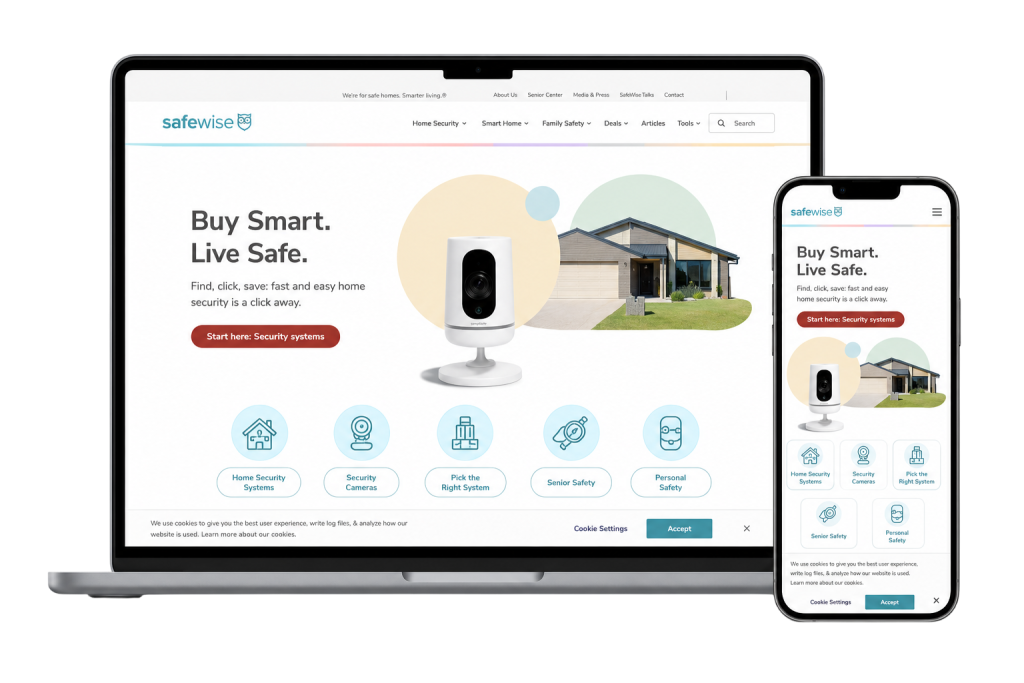
The SafeWise website shown on a laptop and a phone WordPressElementor Pro 2.5 weeksKickoff to launch “Buy Smart. Live Safe.”The promise on every page
The Brief

Great Research. Hard to Find Your Way.

SafeWise researches safety products and shares safety data for homes, families and communities, backed by an advisory group of industry experts and hundreds of hours of product testing. Its mission: “Our passion is to make safety accessible and easy for everyone.”

The content was there. Getting people to it was the problem: a large library of articles, reviews and comparisons, many kinds of reader, from parents to seniors to pet owners, and a need to earn trust while still guiding readers to products that fit.

What success looked like

  • Authority in home security
  • Longer visits, deeper reading
  • Easy navigation across a big library
  • More leads and affiliate clicks
  • Mobile-first browsing
  • Fast, scalable content structure
The Challenge → The Solution

Six Problems. Six Clear Paths.

Every obstacle between a worried reader and a confident decision got its own fix.

  1. Too much content, no clear pathHundreds of pages, and no obvious place to start.
    Topic-first navigationHome Security, Senior Safety, Kids Safety, Deals, Awards and News, right in the main menu.
  2. Content hard to discoverGood guides and reviews were buried a few clicks too deep.
    Category shortcutsIcon-led entry points on the homepage: Home Security, Cameras, Kid & Pet, Senior and Personal Safety.
  3. Many readers, one homepageParents, seniors and pet owners all landed on the same generic page.
    A path for every readerEach audience gets its own clear entry point, and a local “safest city” finder for everyone.
  4. Trust had to hold everywhereIn safety, one weak page can undo the credibility of the rest.
    Authority built inExpert reviews, awards, “Safety by the stats” and a “Who we are” section behind the research.
  5. Education vs. conversionPush products too early and readers stop trusting the advice.
    Helpful first, then “Buy smart”“Buy smart with our top picks” sits after the guidance, never in front of it.
  6. Slow and awkward on mobileHeavy pages and small tap targets for readers on phones.
    Mobile-first and fastLighter templates, responsive layouts and an SEO-friendly content structure.
The Outcome

Research People Can Actually Use.

A library that used to feel endless now has a clear front door.

9Safety topics, from home security to emergency prep
50States in the “safest city” finder
5One-tap category shortcuts on the homepage
7Homepage sections, each with one job
The reader journey

From Worried Question to Confident Choice

  1. 1
    Find your topic

    The main menu or a category shortcut, in one tap.

  2. 2
    Read the research

    Guides, local safety stats and expert product reviews.

  3. 3
    Buy smart

    Top picks and deals, once the reader knows what they need.

“We do the research to make your home and community safer.”

Inside the Platform

Seven Sections. One Clear Story.

The homepage moves a reader from “am I safe?” to “here’s what to do”, one section at a time.

  1. 01
    A hero with a promise

    “Buy Smart. Live Safe.” Then one line on why: the research is done for you.

  2. 02
    Category shortcuts

    Home Security, Security Cameras, Kid & Pet, Senior and Personal Safety, one tap each.

  3. 03
    Find the safest city

    A state picker for all 50 states that turns big data into something local.

  4. 04
    Recent news & safety stats

    Fresh stories and hard numbers keep the site current and credible.

  5. 05
    Top picks & expert reviews

    “Buy smart with our top picks”, backed by product reviews from the experts.

  6. 06
    Let’s connect & Who we are

    Social channels, then the people and the mission behind the research.

The Process

How the 2.5 Weeks Went.

Structure first, then design, then build. The design was approved before any code was written.

Week 1Days 1–7

Plan & Design

  • Content audit: articles, reviews, comparisons and tools
  • Navigation: a topic-first menu and category shortcuts
  • Design: a clean, trustworthy look, approved before building
Week 2Days 8–14

Build

  • Templates: articles, reviews and comparisons in Elementor Pro
  • Homepage: all seven sections, built to be easy to update
  • Tools: the safest-city finder and top-picks blocks
Final DaysDays 15–18

Test & Launch

  • Testing: phones, tablets and every main browser
  • Speed & SEO: PageSpeed checks and a clean heading structure
  • Launch: go-live, handover and support
Built with WordPressElementor ProHTML5CSS3JavaScriptGoogle AnalyticsPageSpeed Insights
Your Site Next?

Lots of Content? Let’s Make It Easy to Use.

Blogs, review sites and resource hubs. Tell me about yours in a short guided form and get a clear plan and a fixed price before any design or code.
More Case Studies

View all projects